I’m trying to recover missing wedding photos from a CF card after a recent shoot. The card suddenly stopped showing several important images, and I’m worried they may be corrupted or accidentally deleted. These wedding photos are irreplaceable, so I need advice on the safest CF card recovery steps, software, or services that might help without causing more data loss.
CF card showed up empty, what I’d do first
Yeah, this is a bad feeling. I had a card do this after a shoot once, and the first thing I learned was simple. Empty does not always mean gone.
What bites you first is usually the file table, not the photo data itself. The card loses track of where the files live, so your camera or computer shows a blank card, corrupted card, or asks to format it. Meanwhile, the raw data might still be sitting there.
Stop touching the card
If you want the best shot at getting files back, stop using it now.
Do not:
- put it back in the camera
- shoot more photos
- copy anything onto it
- accept a format prompt
- run repair tools on it
Every write to the card raises the chance of overwriting stuff you still want.
The route I’d try first
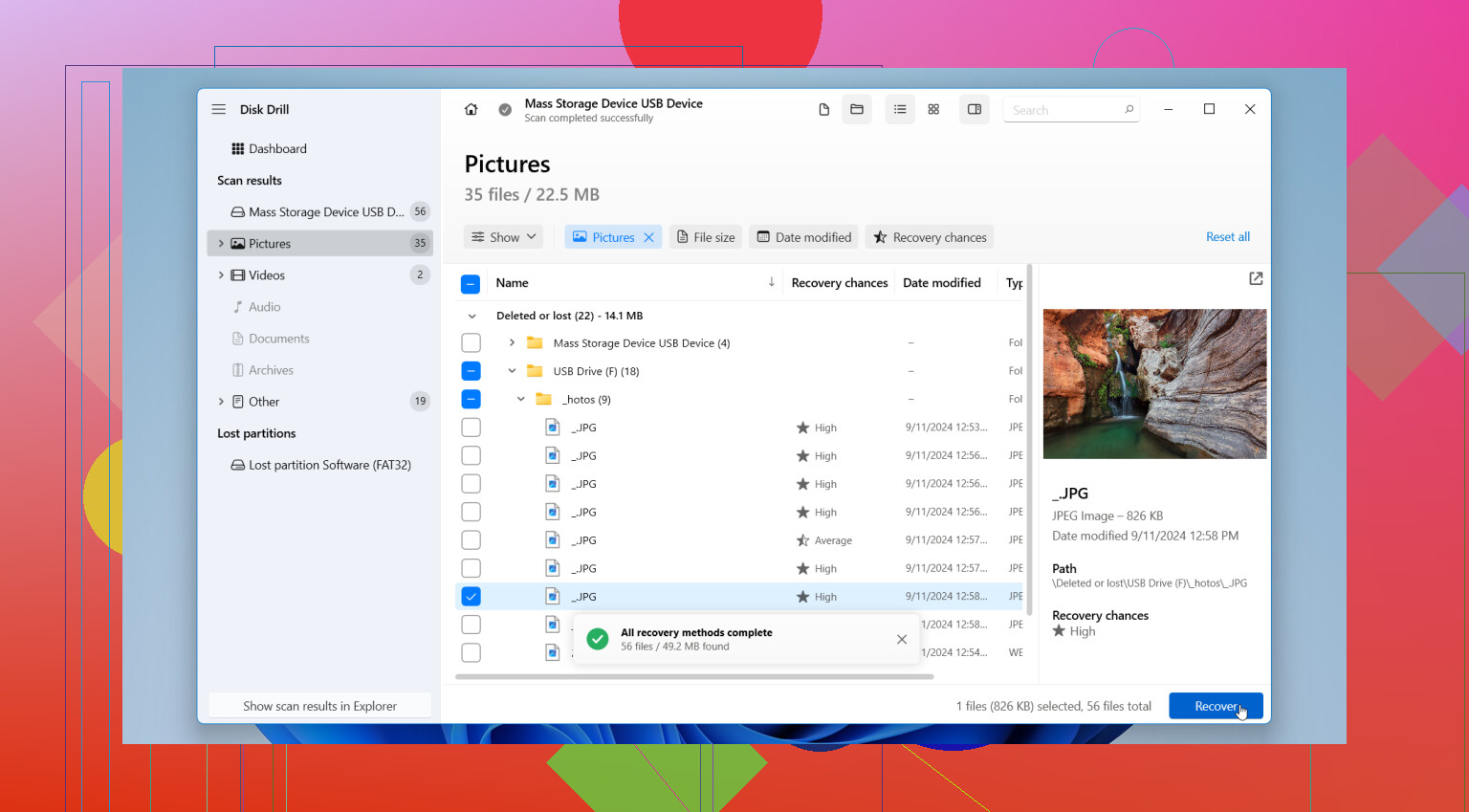
If the card still shows up on a computer, I’d start with recovery software before doing anything else. I’ve had decent results with Disk Drill for this kind of thing.
Why I’d start there:
- easy enough to use without guessing through menus
- reads common CF card file systems like FAT32 and exFAT
- finds camera file types people care about, JPG, CR2, CR3, NEF, ARW, MOV, MP4
- preview helps sort out what is recoverable and what is junk
Preview matters more than people think. If a file opens in preview, your odds are usually better.
The steps, plain and boring
- Remove the CF card from the camera. Leave it out.
- Connect it with a dedicated CF card reader.
- Install the recovery app on your computer, not on the card.
- Open the software and scan the CF card.
- Let the full scan finish if the card stays connected and readable.
- Preview the found photos and videos.
- Recover the files to a different drive, your computer, an SSD, whatever is not the same CF card.
That dedicated reader part matters. USB camera connections tend to be flaky for recovery. A card reader usually gives cleaner access.
One mistake I would avoid
Do not recover files back onto the same CF card.
I know this sounds obvious, but people do it in a panic. Then the card writes over the same missing files they were trying to save. Bad loop.
If the card is acting weird
This changes things a bit.
If the card is:
- slow to read
- dropping connection
- throwing read errors
- freezing mid-scan
then I’d make a full image of the card first, byte for byte, and scan the image instead of the physical card. Less stress on failing media. Safer workflow too.
Stuff I would not run yet
I would skip CHKDSK, macOS First Aid, or any repair option until after recovery.
Those tools try to fix the filesystem. Sounds good on paper. In practice, they change things on the card, and you do not want changes before your files are copied out. Get the data first. Fix or format later.
When software is not the move
If the CF card:
- is not detected anywhere
- has bent or damaged pins
- gets hot
- disconnects over and over
- holds files you cannot afford to lose
then I’d stop and look at a recovery service instead of pushing it harder myself.
For a card your computer still detects, software is usually the first thing I’d try. For a card with physical issues, I woudln’t keep poking at it.
Hope this helps.
1 Like
First thing, treat the CF card like evidence. No more writes, no format, no repair scan.
I agree with @mikeappsreviewer on stopping use, but I’d push one extra step first. Make a full image of the card before you poke at recovery too much, if the card is still readable. Recovery apps work better when you scan a stable image file instead of a card with flaky reads. If the card drops once during a scan, you lose time and sometimes more data.
A few checks I’d do:
- Try a different CF reader.
- Try a different USB port.
- Check Disk Management on Windows or Disk Utility on Mac.
- See if capacity looks correct. A 32GB card showing 31GB is a decent sign. A card showing 0 bytes is worse.
If the missing shots were RAW, look for sidecar loss or broken directory entries, not only deletion. I’ve seen wedding folders vanish while the RAW files still existed under file carving results with renamed filenames.
If you need software, Disk Drill is a solid pick for CF card photo recovery. I’d compare found files by preview and file size. Tiny RAW files usually mean damage. Full-size previews are what you want.
Recover to another drive. Then sort by date taken in Lightroom or Bridge. That saves time when filenames are trashed.
For search terms, think best photo recovery software for SD and CF cards, easier to read and more on target.
Also, this clip is worth a look if you want another angle on file recovery workflow,
see a quick card recovery walkthrough
If the card has bent pins or keeps disconnecting, stop there. Lab service. Wedding files are not the place to yolo it.
I’d add one thing to what @mikeappsreviewer and @sonhadordobosque said: check whether the “missing” wedding shots are actually invisible to the camera/browser but still present in the DCIM folders with weird names. I’ve seen cards where only the index got mangled, and the files were there but not sorted right.
Also, slight disagreement on doing too much testing across a bunch of devices. If the CF card is unstable, every extra mount is another chance for it to act dumb. I’d pick one solid reader, one machine, and stick with that.
What I’d do differently:
- check the card in a hex/disk viewer or at least see if used space still looks occupied
- if used space is still high, that’s a decent sign photos may still be there
- sort recovered results by file signature, not filename
- verify RAWs by opening a few in Lightroom/ACR, not just thumbnail preview
For software, Disk Drill is fine for CF card photo recovery, esp if you need to pull JPG/RAW fast without getting too nerdy. But if the recovered files come back with the right size and won’t open, that usually means corruption, not simple deletion.
And yeah, do not format it “just to see if it fixes it.” That trick has ruined a lot of phtos.
If you want another thread on CFexpress image recovery and recovery workflow, this is pretty relevant:
CFexpress image recovery help on Reddit
If the card has actual hardware issues, stop DIY there. Wedding files are the one time I’d spend money before making it worse.