I started using Decopy AI Humanizer to make AI-written content sound more natural, but the results have been mixed. Some text reads better, while other parts still feel robotic or get flagged by AI detectors. I need help figuring out whether this tool is actually worth using, how accurate it is, and if anyone has found better alternatives.
Decopy AI Humanizer
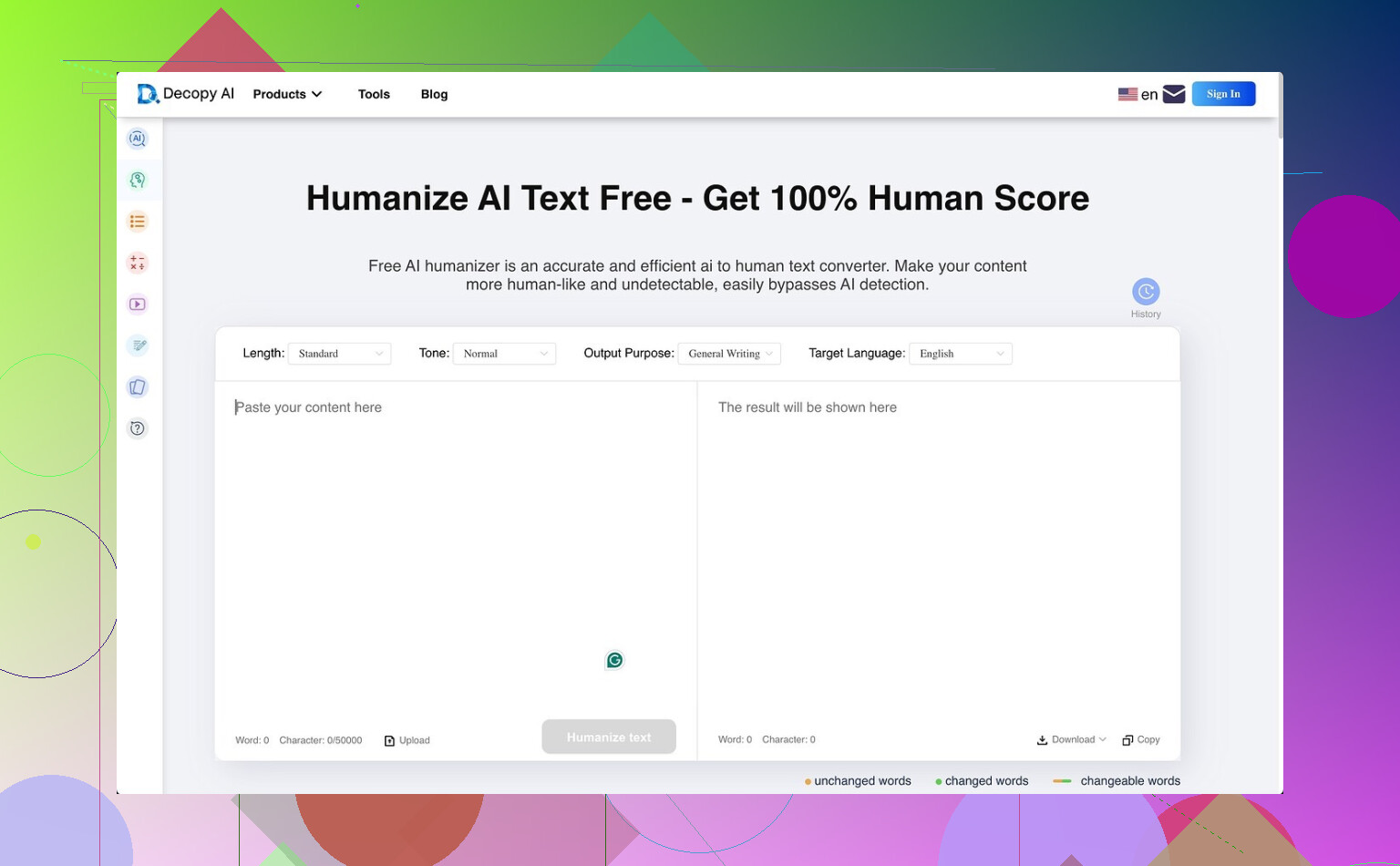
I tried Decopy AI Humanizer for a bit, mostly because the free tier looked kind of wild. You get 500 free runs, and each request goes up to 50,000 characters. On paper, ths is more generous than most tools in this space. It also includes eight tone options, nine purpose presets, and a sentence-by-sentence redo tool, which I liked more than I expected. If one line comes out weird, you can rerun only that part instead of torching the whole draft.
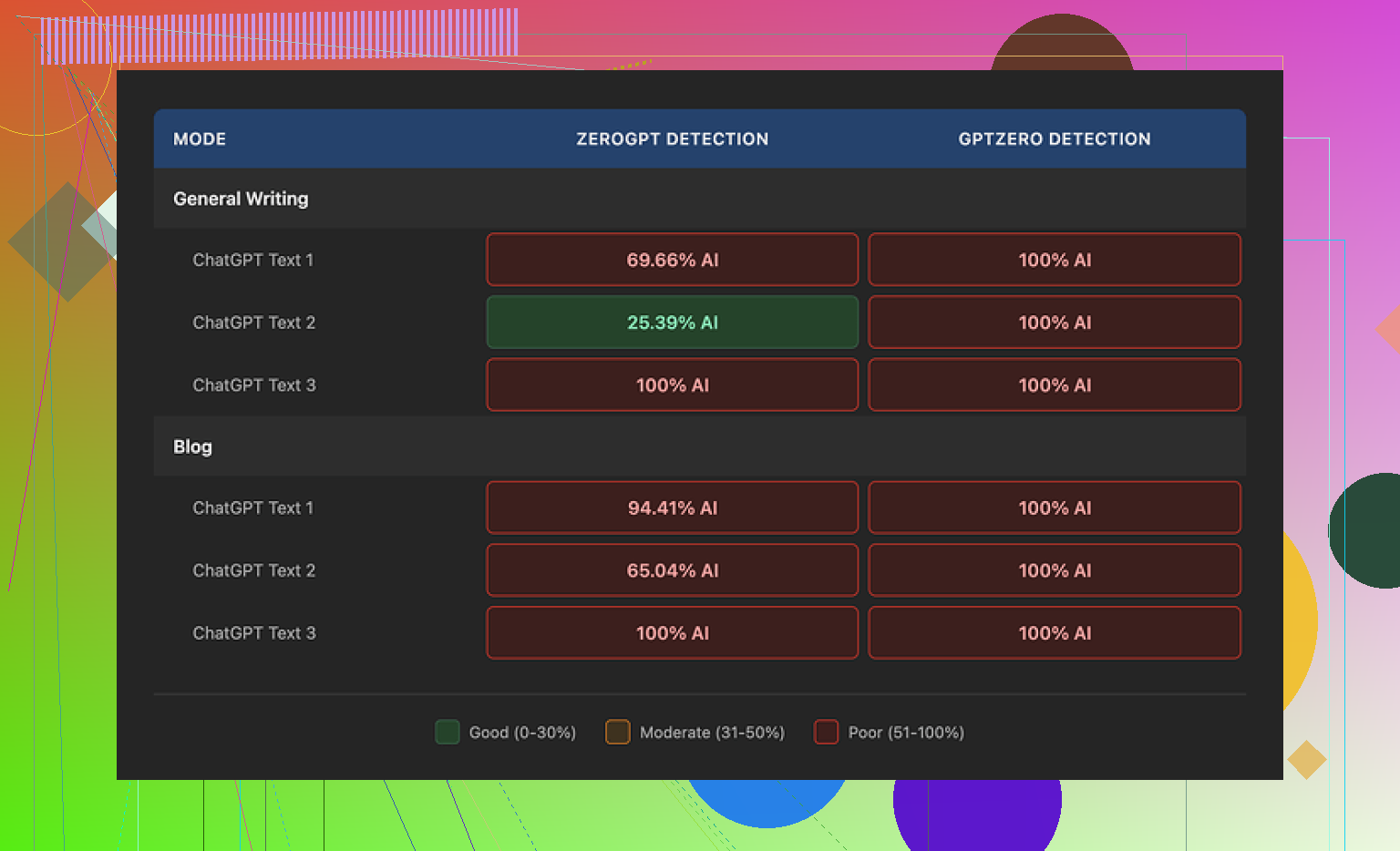
The bad part showed up fast. In my tests, the rewritten text still read like machine output to detectors. GPTZero flagged every sample at 100% AI, both in General Writing and Blog mode. ZeroGPT moved around more, somewhere between roughly 25% and 100% depending on what I fed it, but the pattern was still not good if your goal is detection evasion.
One thing I will give it, Decopy did not wreck grammar. I saw fewer broken sentences than I got from tools like UnAIMyText and HumanizeAI.io. So if you care about clean output more than detector scores, it does okay. I’d put Blog mode around 7/10 for readability, and General Writing a little higher, maybe 7.5/10.
Still, the writing style bugged me. Blog mode felt flattened, like it was trying to explain everything to a little kid. General Writing was less awkward, but still leaned into stuff like “digital stuff” and “totally changing tech,” which reads fake pretty fast. The upside, if you care about preserving structure, is word count stayed close to the source text. I did not see major shrinkage or bloating.
The privacy page was more specific than I expected. It says data is retained for three months and says it follows GDPR and CCPA rules. What I did not find was a plain answer about submitted text itself, where it goes, how it is stored internally, or what happens after processing. For me, tht gap matters more than a compliance badge.
After testing it side by side, Clever AI Humanizer gave me stronger rewrites and did it for free. On raw output quality versus detection resistance, I had better results there.
1 Like
Mixed results sounds right. I got cleaner grammar from Decopy than some other humanizers, so I disagree a bit with the idea it fails across the board. The bigger issue is consistency. One paragraph looks normal, the next one slips into stiff phrasing and detector bait.
What helped me was changing how I used it.
-
Stop running full articles at once.
Feed 150 to 300 words. Bigger chunks kept repeating the same rhythm. -
Use it for rough variation, then edit by hand.
Swap bland verbs. Cut filler. Add one concrete detail per paragraph. Human text usually has specifics, not smooth generic lines. -
Read it out loud.
If you pause in weird spots, rewrite those sentnces. AI text often has a clean but fake cadence. -
Stop chasing detector scores.
They flip all over the place. Use them as a weak signal, not a pass fail test. -
Start with a messier draft.
If your source is polished AI copy, Decopy tends to keep the same bones. A looser draft gives better output.
@mikeappsreviewer is right about the detector issue. I think Decopy works better as an editing layer, not a final fix. If your goal is natural writing, manual passes still do more than one-click tools tbh.
Mixed results is basically the Decopy experience tbh. I agree with @mikeappsreviewer on the detector inconsistency, but I slightly disagree with @voyageurdubois on one thing: I would not even call it a solid editing layer unless your source draft already has some personality. If the input is flat AI copy, Decopy mostly rearranges the furniture.
What helped me more was changing the source before humanizing it. Not after.
A few things to try:
- Write a messy outline first, not full polished paragraphs.
- Add personal bias into the draft. Tiny opinions, preferences, annoyances.
- Break patterning on purpose. Use one short sentence. Then a longer one. Then something kinda blunt.
- Replace generic transitions. Stuff like ‘furthermore’ and ‘in conclusion’ screams tool-made.
- Add low-stakes specifics. Time, place, brand, mistake, example. Even one per section helps a lot.
Also, if a tool keeps getting flagged, stop treating it like a bypass machine. Use it like a remix tool. Big diff. AI detectors are flaky anyway, but robotic rhythm is real and readers notice it fast.
So yeah, Decopy is usable, just not magic. Kinda decent for cleanup, kinda bad at making text feel lived-in. That part still takes a human, annoyngly enough.
Mixed is the right verdict, but I slightly disagree with the detector-first framing from @voyageurdubois, @espritlibre, and @mikeappsreviewer. The bigger test is whether a real reader notices the seams. Decopy AI Humanizer sometimes passes that test, sometimes absolutely does not.
What I found useful was treating Decopy like a compression tool for stiffness. Not a humanizer. If a draft already has opinions, texture, and a clear point of view, it can smooth rough edges without wrecking structure. If the draft is generic AI sludge, Decopy AI Humanizer usually just converts generic into cleaner generic.
A few things I would try that are different from the usual chunking and read-aloud advice:
- Change the paragraph order after rewriting. AI tools often preserve a too-neat logic flow.
- Reinsert one awkward but natural phrase you would actually say. Real writing is not perfectly balanced.
- Remove summary sentences. Human writers often stop earlier than AI does.
- Add contrast, not just detail. A sentence like “this sounds efficient, but it is annoying in practice” helps a lot.
- Check nouns more than adjectives. Robotic text often hides in vague nouns like platform, solution, process, landscape.
Pros for Decopy AI Humanizer:
- generous free usage
- grammar usually stays intact
- sentence-level reruns are genuinely handy
- keeps article length fairly stable
Cons:
- style can turn flat fast
- detector performance is shaky
- output rhythm gets repetitive
- privacy clarity still feels incomplete
If you want cleaner readability, it is usable. If you want lived-in writing, you still have to put that back yourself.