I accidentally formatted my external hard drive and lost years of family photos and personal pictures. I’m trying to find the best way to recover them without causing more damage, and I really need advice on safe hard drive photo recovery methods or software that actually works.
Formatted the wrong drive. I did too.
I’ve done this once, and yeah, the empty drive view hit me like a brick. Progress bar finished, folder list gone, and I thought I had wiped my stuff for good. It felt over. It wasn’t.
If you formatted a drive by mistake, stop touching it now. That part matters more than people think.
First move, leave the drive alone
If it’s an external drive, unplug it.
If it’s internal, do not save files to it. Do not install apps on it. Do not move stuff around and hope for the best. I’ve seen people turn a recoverable mess into a dead end by trying five random fixes in a row.
Every new write to the drive eats into your recovery odds. Simple as that.
Check the boring stuff before recovery tools
I know this sounds dumb, but I’d still check sync services first.
Look in:
- OneDrive
- Google Drive
- iCloud
- File History on Windows
I’ve seen people swear a drive wipe killed everything, then find half their work sitting in cloud sync. Annoying, but better than gone.
Quick Format and Full Format are not the same thing
This part trips people up a lot.
Quick Format
In many cases, Quick Format clears the file system info, so the OS stops knowing where files live. The drive looks empty, but much of the raw data may still be there until new data lands on top of it.
So yeah, recovery after Quick Format is often possible.
Full Format
Full Format is rougher. Modern systems usually write across the disk and check for bad sectors too. Once old data gets overwritten, software is out of luck.
So if you did a Full Format, your chances drop fast.
If no backup exists, I’d move to recovery software
I’ve tried a bunch of recovery tools over time. For formatted drives, I’d usually start with Disk Drill.
What I liked when I used it:
- It wasn’t fussy
- It works on Windows and Mac
- It reads common file systems well
- It has Byte-to-Byte Backup, which matters more than people give it credit for
That backup feature lets you make a full image of the drive first, then scan the image instead of hammering the original disk again and again. If the drive is old, flaky, or making weird noises, I’d do that first.
The basic recovery flow
- Install Disk Drill on a different drive.
- Scan the formatted drive.
- Wait. Some scans take a while.
- Preview what it finds.
- Recover files to another drive, not the same one.
That last part is non-negotiable. Writing recovered files back onto the original drive is how people step on what’s left.
Preview matters more than people think
This is the part I watch closest.
If a photo opens in preview, or a document renders properly there, I feel better about its odds. Not perfect, still useful. If preview is broken, the recovered file might be broken too.
So don’t skip preview and recover 80 GB blind. I did something like that once. Huge waste of time.
Free option if you don’t mind rough edges
PhotoRec is worth a look if you want a free tool and don’t mind getting your hands dirty.
It works. It’s not pretty.
The catch is organization. Recovered files often come back with generic names and no folder structure, so you end up sorting through a pile of mystery files. If your drive had years of photos and docs, expect a mess. I mean a real mess.
What decides whether recovery works
From what I’ve seen, time and drive usage decide a lot.
Best case:
- You formatted it
- You stopped right away
- It was a Quick Format
- You recover to another drive
Worst case:
- You kept using it
- Installed tools onto it
- Copied new files onto it
- Ran a Full Format
I’ve seen near-complete recoveries. I’ve also seen people wipe their own chances out in the hour after the mistake.
So, if this happened to you, pause. Check backups first. If nothing’s there, run recovery software. And keep the original drive as untouched as possble.
1 Like
If the photos matter more than the drive, skip DIY after the first pass and think like triage.
I agree with @mikeappsreviewer on one big point, stop writing to the disk. But I’d push one step further. If the external drive is clicking, dropping offline, or taking forever to mount, do not scan it over and over. Clone it first or send it to a lab. Repeated reads on a failing HDD make things worse. SSDs are a diff story too. If TRIM kicked in after format, software recovery rates drop hard.
A few practical checks people miss:
1. Check the drive size in Disk Management or Disk Utility. If capacity looks wrong, this might be partition damage, not a plain format issue.
2. Look at SMART health with a read-only tool. Reallocated sectors, pending sectors, or I/O errors mean the drive itself is sick.
3. If the photos are irreplaceable, set a dollar limit now. Lab recovery often runs from a few hundred to well over $1,000, but family photos are one of the few cases where paying makes sense.
For software, Disk Drill is a fair starting point because it handles formatted partitions well and lets you preview image files before recovery. I’d recover a small test batch first, maybe 20 to 50 photos, and open them. If previews work but full files fail, the data is fragmented or overwritten.
Also, file carving tools often lose original names and folders. If keeping albums and dates matters, file system recovery beats raw photo scraping.
If you want a simple walkthrough, watch this step by step guide to recover a formatted hard drive.
Big thing, recover onto a different drive. Not the same one. Seen too many people torpedo thier own recovery doing that.
I mostly agree with @mikeappsreviewer and @ombrasilente, but I’d pump the brakes on one thing: don’t rush straight into a deep scan if these photos are truly priceless. First figure out what kind of drive you have.
If it’s a regular external HDD and it sounds normal, DIY recovery is reasonable. If it’s an SSD, flash drive, or anything that uses TRIM, recovery after formatting can go from “maybe” to “almost nothing” weirdly fast. That part gets glossed over a lot.
What I’d do:
- Stop using the drive completely
- Plug it into a stable desktop/laptop, not a hub if you can avoid it
- Check whether the format was quick or full
- See if the partition just vanished instead of the files being fully wiped
- Recover only to a second drive
One thing people forget: Windows Photos, Apple Photos, old phones, and even SD cards may still contain copies or synced versions. Also check if someone in the family exported albums at some point. Sounds obvious, but panic makes ppl miss easy wins.
For software, Disk Drill is a solid choice for formatted drive recovery because it can find lost photos by file system data and by signature scan. That matters if you want both folder structure and raw image recovery. If you want a plain-English overview, this Disk Drill review and recovery guide for formatted hard drives is worth a look.
Small tip I don’t see mentioned enough: recover a few JPEGs, PNGs, and maybe one large video first. Not 5,000 files. If the small test set opens fine, then do the rest. Saves a ton of time and heartache tbh.
If the drive is making noises, disconnecting, or freezing Explorer, skip DIY. That’s lab territory, no question.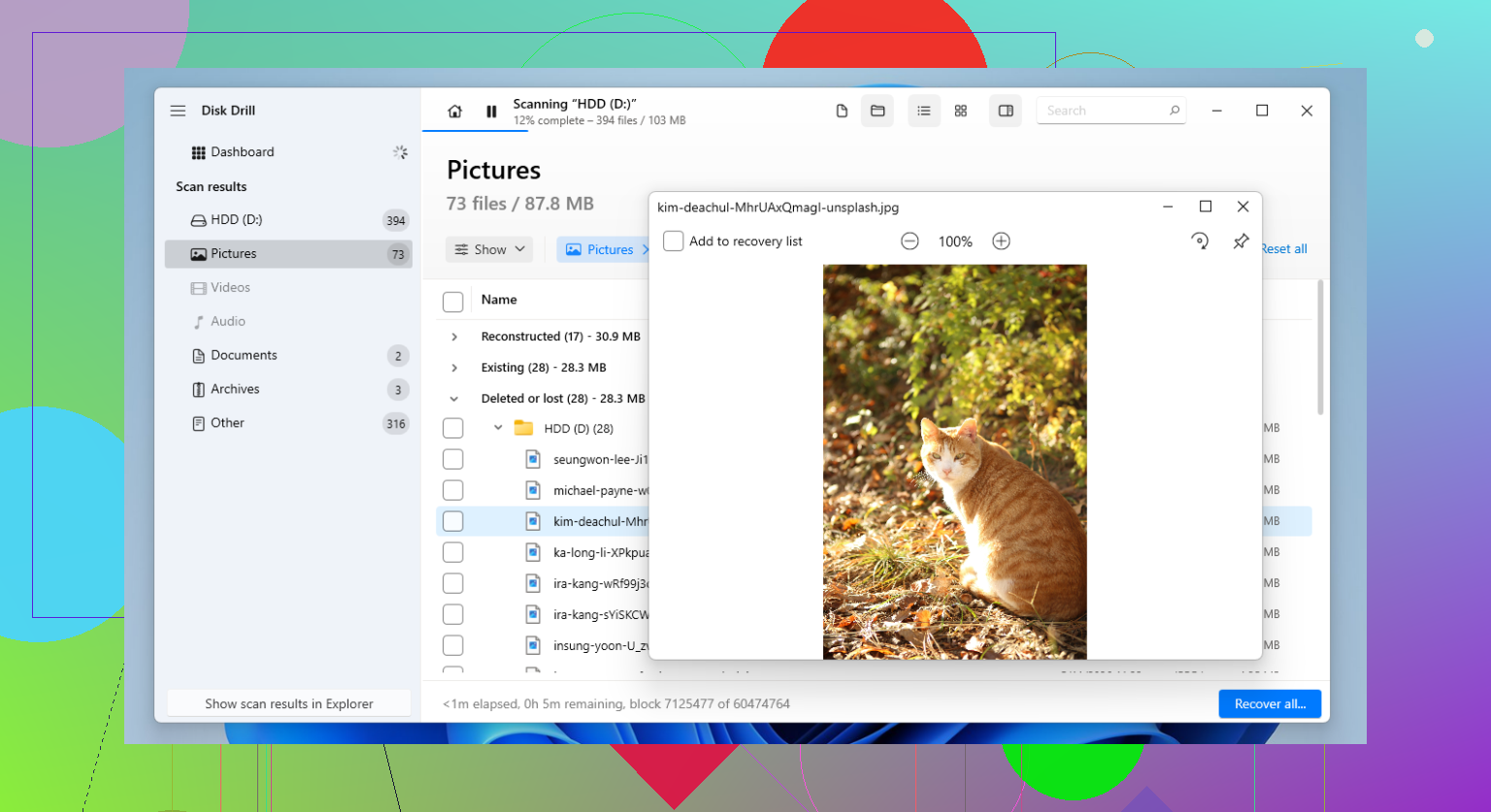
One small disagreement with @ombrasilente and @waldgeist: before any software, check whether the “format” was just a volume label/partition table reset. If the old partition still exists but lost its letter, recovery can be way cleaner than a raw deep scan.
My order would be:
1. Stop using the drive.
2. Check SMART and whether capacity looks normal.
3. If healthy, make an image first if you have space.
4. Then scan the image, not the original.
Disk Drill is a reasonable pick here.
Pros:
- good photo preview
- handles formatted partitions well
- easier than most for beginners
Cons:
- not the cheapest
- deep scans can return lots of junk
- raw recovery may lose filenames/folders
If you want a second opinion after Disk Drill, compare results with R-Studio or UFS Explorer, especially if folder structure matters. @mikeappsreviewer was right about one thing people keep messing up: recover to a different drive only. If this is an SSD and TRIM already ran, skip optimism and consider a lab sooner.