I’ve been using a few “free” online paraphrasing tools to rewrite some blog posts and school papers, but I’m starting to worry there might be hidden limits, copyright issues, or quality problems I’m not seeing. Can anyone explain what kinds of risks or catches usually come with free paraphrasing sites, and how to tell which ones are actually safe and reliable to use?
I used QuillBot for a long time. It did the job for rewriting rough drafts, fixing tone, and making stuff sound less robotic. Then they moved most tones and styles behind a paywall and it stopped being useful for how I work.
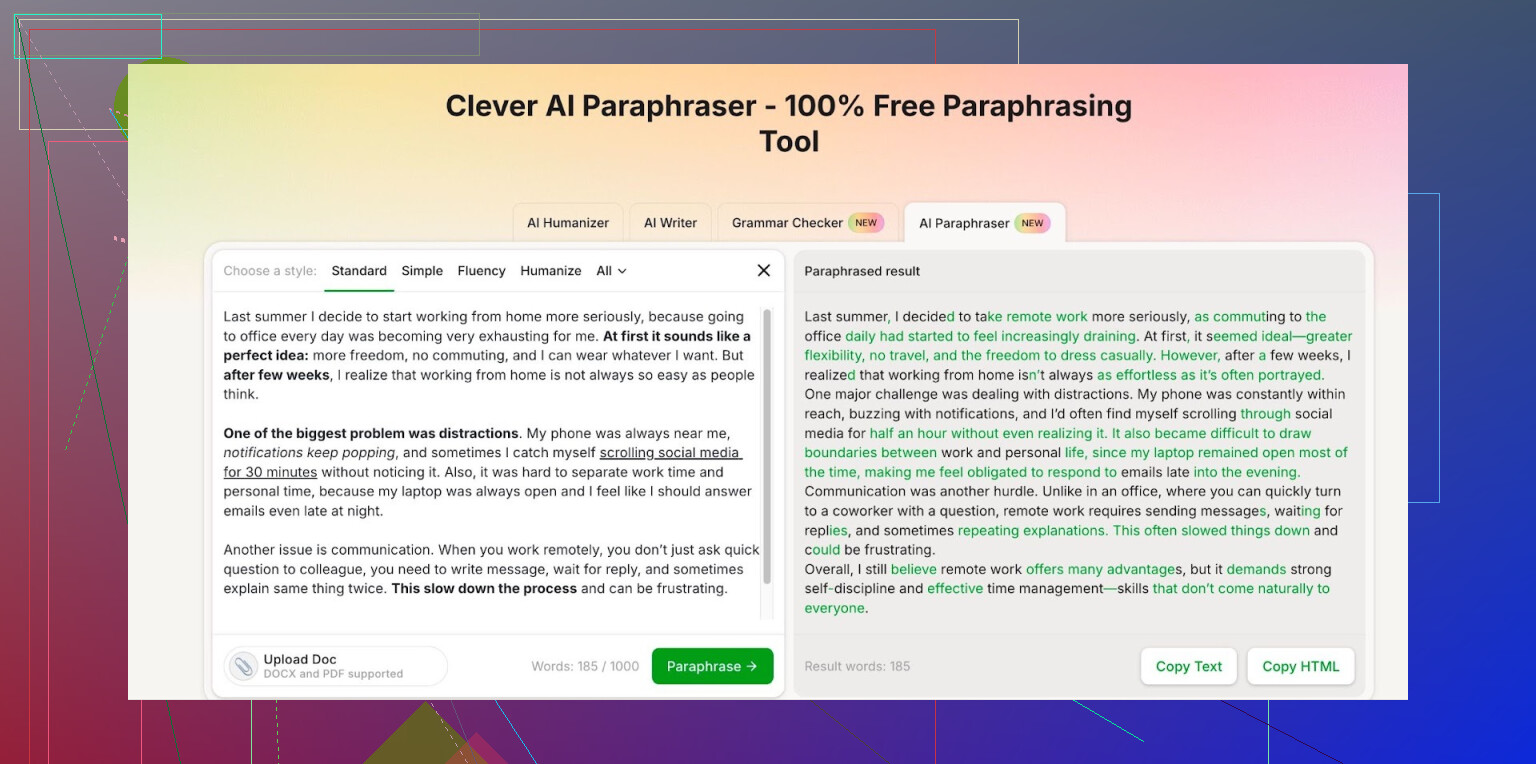
I started hunting around for something I could use daily without getting hit with “upgrade to premium” every few clicks. Ended up on Clever AI Humanizer and stuck with their Free AI Paraphraser here:
What I noticed after a few weeks of use:
- It handles multiple writing styles without locking them behind a subscription.
- After logging in, you get about 7,000 words each day to paraphrase.
- There is also a monthly cap of 200,000 words, which I have not hit even when rewriting long reports and blog drafts.
For context, I use it for:
- Rewriting long, clunky paragraphs from technical docs into simpler English.
- Cleaning up emails so they sound less stiff but still professional.
- Rephrasing duplicate wording when I have to say the same thing in multiple sections.
Output quality feels on par with what I used to get from QuillBot on the paid modes, at least for English. Sometimes I run a sentence through it twice if the first try sounds off, but that was already my habit with any paraphraser.
If you write a lot and you are tired of tools nagging you to pay every time you switch tone or style, this one has been enough for my workflow without paying anything:
1 Like
You are right to worry. Free paraphrasers often have strings attached, but they are not always obvious.
Here are the main “catches” you should watch for:
- Hidden limits
- Daily or monthly word caps.
- Fewer modes or tones for free accounts.
- Shorter max input length for each run.
Some tools do not show this until you hit a wall and get hit with upgrade prompts.
What @mikeappsreviewer said about word caps is pretty realistic. 7k words a day and 200k a month is a lot for normal use. Many other tools cap you way lower or throttle speed after a few runs.
- Data and privacy
This is the big one for school papers and blog drafts.
Check for:
- “We store your text to improve our models” in the privacy policy or ToS.
- “We share data with third parties” with vague wording.
If you paste in essays or client work, your text might end up in logs or training datasets.
Safer habits: - Do not paste full assignments with your name or school info.
- Strip personal data and client names.
- For sensitive stuff, use a local editor or an offline tool instead.
- Copyright and originality
Paraphrasing does not remove your responsibility for plagiarism.
Common issues:
- Output follows the source structure too closely.
- Key phrases stay almost unchanged.
- AI repeats common phrases from its training data.
For school: - Treat paraphrasers as helpers, not final writers.
- Rewrite again in your own words.
- Run your final text through a plagiarism checker.
For blogging:
- Google looks at patterns, not only exact wording.
- If you paraphrase an entire article from one source, you risk duplicate value or even DMCA issues if the source cares.
- Quality problems
Free modes often:
- Flatten your tone, so everything sounds generic.
- Misrepresent technical content.
- Mess with nuance, especially in academic writing.
Good workflow: - Use the tool for a first pass.
- Read slowly and compare to your original.
- Fix meaning, tone, and structure by hand.
If you start skipping that last step, your quality drops fast.
- Academic integrity
Some schools treat AI paraphrasing as misconduct if you present the result as “entirely your own writing”.
Check your school’s AI policy.
Safer way:
- Use it to get a cleaner draft.
- Rewrite again from scratch while looking at the paraphrased version and your notes.
- Add your own analysis, examples, and structure.
- Tool choice
You do not need to stay with the first free tool you tried.
Quick checklist when you test one:
- Clear word limits that fit your workload.
- No aggressive “upgrade” spam every few clicks.
- Plain privacy policy that states what happens to your text.
- Output that keeps meaning and avoids weird phrasing.
Since you mentioned long blog posts and school papers, something like Clever Ai Humanizer can help if you want high word limits and fewer feature locks. It is closer to what you need if you write often and hate constant paywalls. That said, do not trust any tool blindly. Test it on one or two paragraphs first. Compare original and output line by line to see how faithful it stays.
- Simple workflow that stays safe
For blogs:
- Read your sources. Take notes.
- Write your own rough draft.
- Use a paraphraser on clunky parts only, not on the source article itself.
- Edit for voice and fact check.
For school:
- Draft in your own words first, even if messy.
- Run small sections through a paraphraser to smooth wording.
- Rewrite the paraphrased part again to sound like you.
- Add citations for ideas you got from sources, no matter how much you rephrased.
Short answer: yes, there are catches, but you can work around most of them if you
- watch privacy and ToS
- use the tool on your own drafts, not the source text
- treat the output as a suggestion, not a final product.
Yeah, there are catches, but they are not always the ones people focus on. Since @mikeappsreviewer and @suenodelbosque already covered limits, privacy, and plagiarism pretty well, I’ll hit a few angles they didn’t dig into as much:
- “Free” sometimes means you’re the product
Everyone talks about text being stored, but the other side is: some free paraphrasers are basically lead funnels.
- They intentionally give you slightly worse output so you feel the need to upgrade.
- Some throttle speed or “error out” at random to annoy you into paying.
The result: you spend more time fighting the tool than actually writing.
- Style drift & voice erosion
This is underrated. Over time, if you run everything through a paraphraser, your writing starts to sound like the tool, not you.
- Your personal quirks vanish.
- Every email, blog, and essay starts having the same rhythm and generic phrasing.
For school, teachers notice when your “voice” suddenly flips between assignments. For blogs, your regular readers can tell when stuff starts feeling AI-flattened.
- Fact distortion & subtle errors
Everyone mentions “quality,” but the danger is not the obvious garbage, it is the small, sneaky mistakes:
- Reordering clauses so the causal meaning changes.
- Softening or exaggerating claims that were precise before.
- Messing up technical or legal nuance in ways that are hard to spot quickly.
If you are paraphrasing research, legal stuff, or tutorials, this can quietly wreck your credibility.
- Overconfidence trap
Free tools encourage lazy habits:
- “If it cleared the plagiarism checker, I’m fine.” Not necessarily. Structural copying and idea theft are still issues.
- “If AI wrote or rewrote it, it must be correct.” Also wrong. AI confidently rewrites wrong info all the time.
You still have to own the final text.
- Copyright is not just about the source you paste
People worry “if I paraphrase a source article, is it safe?” Fair concern, but also:
- The model itself may produce phrases similar to content in its training data.
- If you’re heavily paraphrasing a single article, even “unique” wording can still be derivative enough to tick off the original author.
A safer mindset: use paraphrasers on your own drafts, not directly on someone else’s article.
-
Academic policies are catching up fast
Some schools now treat heavy AI paraphrasing the same as buying a paper. They do not care that “I wrote the first draft.”
I actually half‑disagree with the idea that paraphrasers are fine as long as you rewrite again. That can still look like AI-assisted authorship if your school is strict. If grades or academic records matter a lot, you should check guidelines first instead of assuming it’s “just a tool like spellcheck.” -
Tool differences actually matter
This is where I do agree with the others: bouncing between random free sites is a bad strategy. Different tools handle:
- Tone control
- Sentence restructuring
- Preservation of meaning
very differently.
If you want to stick with AI and not pay, something like Clever Ai Humanizer at least sets clear word caps and doesn’t hide every useful tone behind a paywall. That predictability is more important than it sounds, especially if you’re rewriting long blog posts or multiple drafts a day.
I wouldn’t rely on any paraphraser as a “write my paper but safe” button though. Best balance people rarely want to hear:
- Draft in your own words.
- Use a paraphraser sparingly for clunky parts or repetition.
- Do a careful pass to restore your voice and fix any warped meaning.
If you ever find yourself feeding full source articles in and pasting the output straight into a blog or assignment, that is exactly the point where all the “hidden catches” become real problems.