My SD card suddenly stopped showing all my files after I moved photos and videos from my camera, and now I’m trying to recover them without paying upfront. I need help finding the best free SD card recovery software that actually works, is safe to use, and won’t make the data loss worse.
If you deleted files from an SD card, your odds are often decent if you stopped using the card right away. I’ve had this happen with camera cards, and the main issue was never the delete itself. The risk came after, when new photos or clips started landing on the same space. Deleting usually removes the file’s listing in the card’s file system first. The underlying data often sits there until something else replaces it.
What I’d do before running any recovery tool:
- Stop using the SD card now. Don’t shoot more photos, don’t copy anything onto it, and skip random repair prompts.
- Plug the card into a proper card reader. I’ve had worse results when going through a phone or camera connection.
- If the card drops out, freezes, shows up as RAW, or feels unstable, make a byte-for-byte backup first. Scan the image file, not the card.
- Save recovered files somewhere else. Your PC, an external SSD, whatever you have. Do not write them back to the same SD card.
For software, here’s how I’d sort it.
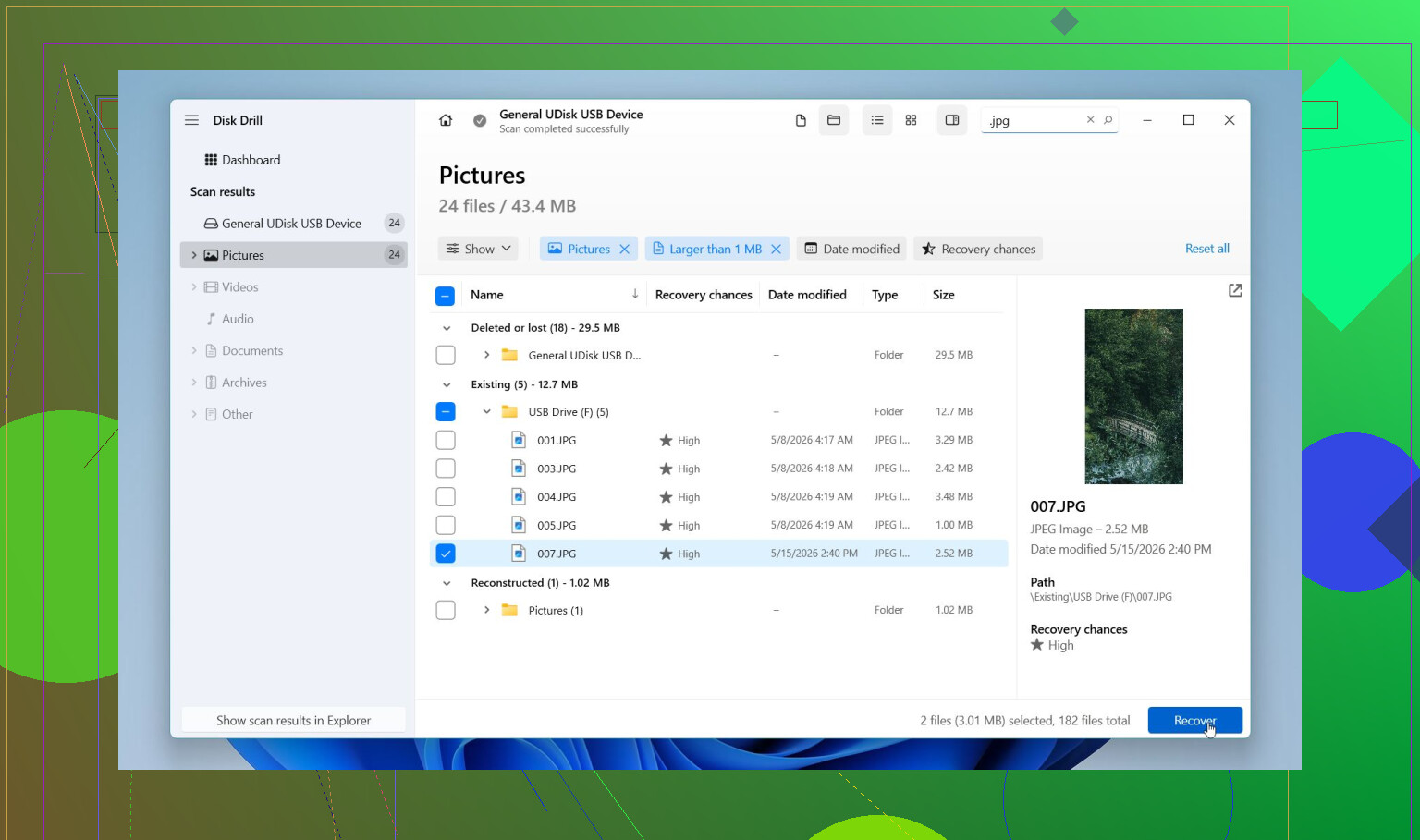
This would be my first try for most SD card problems. It’s easier to deal with than a lot of the older recovery tools, and the preview feature saves time. You get a quick sense of whether the scan found usable stuff or a pile of junk. It handles deleted files, formatted cards, RAW cards, and cards with file system damage.
The part I’d pay attention to for camera media is Advanced Camera Recovery. That matters more than people think. A lot of apps will detect chunks of video, then hand you a file that refuses to play. I’ve seen this with action cam footage and drone clips. Disk Drill tends to do better with fragmented video from stuff like GoPro, DJI, dashcams, Insta360, Canon, Nikon, Sony, and similar gear. It also supports common camera RAW formats, including CR2, CR3, NEF, ARW, RAF, and others. On Windows, there’s up to 100 MB of free recovery, so you can test before going further.
PhotoRec
If you want free and don’t mind a rougher process, this is the one I’d keep around. It’s good when the file system is a mess or mostly gone. It supports a huge range of file types and digs deep.
The tradeoff is the interface. It feels old, because it is old. It also tends to recover files without original names or folders, so cleanup after the scan gets annoying fast. I’ve ended up with a mountain of renamed files before. It worked, but sorting them was a chore.
Recuva
This one is fine for basic Windows jobs. If you deleted some JPGs or docs from a healthy FAT32 or exFAT card not long ago, it’s worth a shot. It’s light, free, and quick to run.
I wouldn’t use it first for damaged cards, newer RAW photo formats, or broken-up video files. That’s where it starts falling behind.
UFS Explorer
This is where I’d go when the case looks messy and I want more control. Formatted card, damaged file system, weird scan results, image-based recovery, stuff like that. It has stronger low-level options than simpler tools.
The catch is the interface. It leans technical. If you already know your way around partitions and disk images, it feels useful. If not, it can get confusing prety fast.
R-Photo
On Windows, this is a solid free pick if your target is photos and video only. I’ve found it easier to use than PhotoRec, and the previews help a lot when you’re trying to confirm whether the scan found the right media.
The limit is scope. It’s aimed at media recovery, not every file type under the sun.
If I wanted the shortest route with the least friction, I’d start with Disk Drill, preview what it finds, and recover to another drive. If you need a no-cost fallback, PhotoRec or R-Photo make sense. If the SD card is unstable, I would not keep hammering it with repeated scans. Make a byte-to-byte image first, then work from the copy.
1 Like
Best free pick for an SD card? I’d split it by what “free” means to you.
If you want the best chance with photos and videos, Disk Drill is the one I’d test first. The free Windows recovery cap is small, but the scan and preview tell you fast if your files are still there. For camera cards, preview matters more than people admit. If the thumbnails and clips open, you know where you stand.
If you want zero dollars, full stop, I’d put R-Photo ahead of PhotoRec for most people. Less mess, easier sorting, better for photo/video jobs. I know @mikeappsreviewer mentioned PhotoRec, and it does dig hard, but I don’t love it as a first option unless you enjoy sorting hundreds of weirdly named files for no reason.
Recuva is fine for simple deletes. It falls off once the card gets flaky or the file system looks broken.
Also worth reading if your main goal is photo recovery from memory cards, best image recovery software for photos and SD cards.
My order:
- Disk Drill
- R-Photo
- PhotoRec
- Recuva
One thing people miss, if files vanished after a move, this wasen’t always deletion. Sometimes the card index gets damaged. In that case, tools with solid RAW scan support do better.
Best truly free? I’d split it a little different than @mikeappsreviewer and @voyageurdubois.
If you want completely free SD card recovery software, R-Photo is probly the easiest no-pay option for photo/video recovery on Windows. It’s cleaner than PhotoRec and doesn’t make you feel like you’re operating a 2004 router menu.
If you want the best chance of actually getting usable files back, I’d still test Disk Drill first. Not because of the free cap, but because it’s one of the faster ways to see whether the missing files are realy recoverable or just ghost entries. Preview is huge. A lot of “free” tools recover trash and call it a win.
One mild disagreement with the usual ranking: I think Recuva gets recommended too often for SD cards from cameras. For simple deletes, sure. For cards that went weird after a move or transfer, meh. It’s not where I’d start.
My practical ranking:
- R-Photo for actually free
- Disk Drill for best overall recovery attempt
- PhotoRec if you can tolerate messy output
- Recuva only for basic cases
Also, if the files disappeared after moving them, check the destination device too. I’ve seen people blame the SD card when Windows Explorer just borked the transfer and hid files somewhere dumb.
For extra context, this short video on the best data recovery software for SD cards and deleted files is worth a look.
I’d be a little less generous to PhotoRec than @voyageurdubois, @kakeru, and @mikeappsreviewer. It’s powerful, but for SD cards that “lost” files after a transfer, I care more about whether the recovered stuff is actually viewable and organized, not just dumped out in bulk.
My take:
Best free-free option: R-Photo
- Pros: actually free, simpler than PhotoRec, decent for photos/video
- Cons: narrower focus, not my favorite for mixed file types
Best first tool to test the card: Disk Drill
- Pros: very good scan quality, strong previews, handles damaged card metadata better than basic free tools, usually faster to judge whether recovery is realistic
- Cons: Windows free recovery limit is small, full recovery may require payment, not the pick if you refuse any paid ceiling at all
Recuva: okay for clean accidental deletes, not my first choice for camera-card weirdness.
What I’d add that hasn’t been stressed enough: if files vanished after a “move,” also check whether they were turned into hidden files or the destination copy failed halfway. Sometimes recovery software is solving the wrong problem.
So my short ranking:
- Disk Drill for best first pass
- R-Photo for truly free recovery
- Recuva for simple cases
- PhotoRec only if you’re fine sorting a mess afterward
If the card still mounts, check hidden files before deep-scanning everything.